 6a0877384d
- Remove undeployed challenges: Phantom_Byte, Cr4cK_w1f1, Lain_Br34kC0r3 V1, Lain_VS_Knights, Lets_All_Love_UART, AETHER_NET, Last_Train_451, Web3/ - Sync 24 solve/ files from main CTF-Espilon repo - Update all READMEs with real CTFd final scores at freeze - Add git-header.png banner - Rewrite README: scoreboard top 10, edition stats (1410 users, 264 boards, 1344 solves), correct freeze date March 26 2026 |
||
|---|---|---|
| .. | ||
| solve | ||
| README.md | ||
ESP Start
| Field | Value |
|---|---|
| Category | ESP |
| Difficulty | Easy |
| Points | 100 |
| Author | Eun0us |
| CTF | Espilon 2026 |
Description
Welcome to the ESP category.
Flash this firmware onto an ESP32 and connect to the UART console at 115200 baud.
The device outputs something on boot. Decode it.
Format: ESPILON{flag}
TL;DR
Flash the provided firmware, read the XOR-encrypted flag and its key from the UART boot output, apply XOR, get the flag.
Tools
| Tool | Purpose |
|---|---|
esptool.py |
Flash firmware to ESP32 |
screen / minicom |
Read UART serial output |
| Python 3 | XOR decryption |
Solution
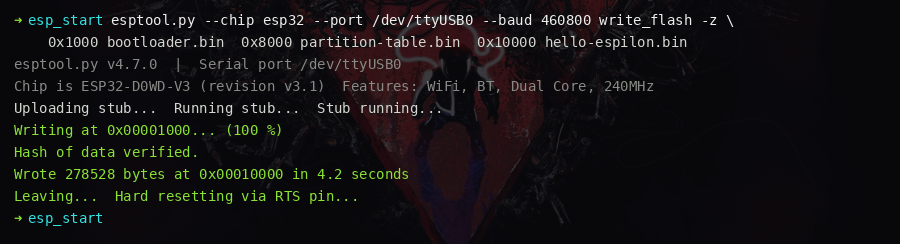
Step 1 — Flash the firmware
Install esptool and flash all three binary files at their correct offsets:
pip install esptool

esptool.py --chip esp32 --port /dev/ttyUSB0 --baud 460800 write_flash -z \
    0x1000  bootloader.bin \
    0x8000  partition-table.bin \
    0x10000 hello-espilon.bin
On Linux, add your user to the dialout group first if you get a permission error:
sudo usermod -a -G dialout $USER
Step 2 — Connect to the UART console
Open a serial terminal at 115200 baud:
screen /dev/ttyUSB0 115200
# or
minicom -D /dev/ttyUSB0 -b 115200
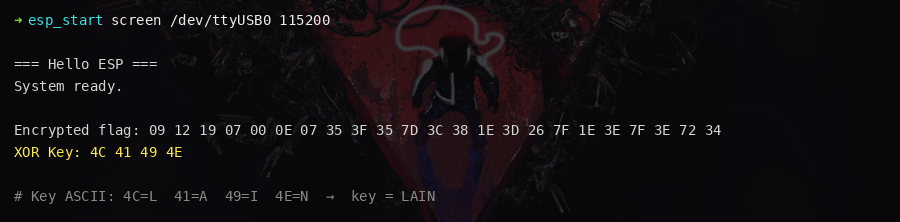
Press the RESET button on the ESP32. The boot output appears:
=== Hello ESP ===
System ready.

Encrypted flag: 09 12 19 07 00 0E 07 35 3F 35 7D 3C 38 1E 3D 26 7F 1E 3E 7F 3E 72 34
XOR Key: 4C 41 49 4E
Step 3 — Identify the XOR key
Convert the key bytes 4C 41 49 4E to ASCII:
0x4C = 'L'
0x41 = 'A'
0x49 = 'I'
0x4E = 'N'
Key = LAIN (the protagonist of the series).
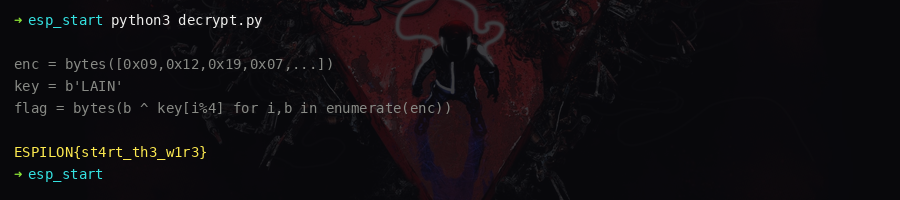
Step 4 — Decrypt the flag
Apply the key cyclically to each byte of the encrypted output:
enc = bytes([
    0x09, 0x12, 0x19, 0x07, 0x00, 0x0E, 0x07, 0x35,
    0x3F, 0x35, 0x7D, 0x3C, 0x38, 0x1E, 0x3D, 0x26,
    0x7F, 0x1E, 0x3E, 0x7F, 0x3E, 0x72, 0x34
])
key = b"LAIN"
flag = bytes(b ^ key[i % len(key)] for i, b in enumerate(enc))
print(flag.decode())
Output: ESPILON{st4rt_th3_w1r3}
Key concepts
- ESP32 flashing:
esptool.pywrites bootloader, partition table, and application binary at their respective flash offsets (0x1000,0x8000,0x10000). - UART monitoring: ESP32 default baud rate is 115200 baud, 8N1, no parity.
- XOR cipher: The key
LAINis broadcast in plaintext — trivial for an intro challenge; the real-world lesson is that hardcoded keys in.rodataare easily extracted withstrings.
Flag
ESPILON{st4rt_th3_w1r3}