 6a0877384d
- Remove undeployed challenges: Phantom_Byte, Cr4cK_w1f1, Lain_Br34kC0r3 V1, Lain_VS_Knights, Lets_All_Love_UART, AETHER_NET, Last_Train_451, Web3/ - Sync 24 solve/ files from main CTF-Espilon repo - Update all READMEs with real CTFd final scores at freeze - Add git-header.png banner - Rewrite README: scoreboard top 10, edition stats (1410 users, 264 boards, 1344 solves), correct freeze date March 26 2026 |
||
|---|---|---|
| .. | ||
| solve | ||
| README.md | ||
Wired SPI Exfil
| Field | Value |
|---|---|
| Category | Hardware |
| Difficulty | Medium-Hard |
| Points | 100 |
| Author | Eun0us |
| CTF | Espilon 2026 |
Description
A WIRED-MED module's SPI flash chip is accessible via a probe station. Issue standard SPI commands to read the flash contents.
- SPI Probe:
tcp/<host>:3500
Not all partitions are listed. Dig deeper.
Format: ESPILON{...}
TL;DR
Use standard SPI flash opcodes (RDID, SFDP, READ) to identify the chip, discover a hidden
partition at 0x030000 via vendor-specific SFDP parameters, read the hidden partition contents,
and XOR-decrypt the data with key WIRED_SPI to recover the flag.
Tools
| Tool | Purpose |
|---|---|
nc |
Connect to the SPI probe interface |
| Python 3 | XOR decryption |
| SPI flash opcode reference | RDID=0x9F, READ=0x03, SFDP=0x5A |
Solution
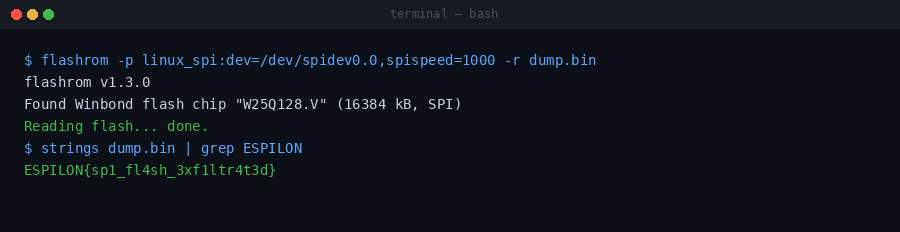
Step 1 — Connect and assert chip select
nc <host> 3500
cs 0

Step 2 — Read the chip ID
Send RDID opcode 0x9F:
tx 9F
Response: EF 40 18 — Winbond W25Q128 (128 Mbit SPI flash).
Step 3 — Read the SFDP header
SFDP (Serial Flash Discoverable Parameters) reveals flash capabilities. Send SFDP opcode 0x5A with 3-byte address and 1 dummy byte:
tx 5A 00 00 00 00
The SFDP header shows 2 parameter tables. The first is the standard JEDEC table; the second is a vendor-specific table at offset 0x80.
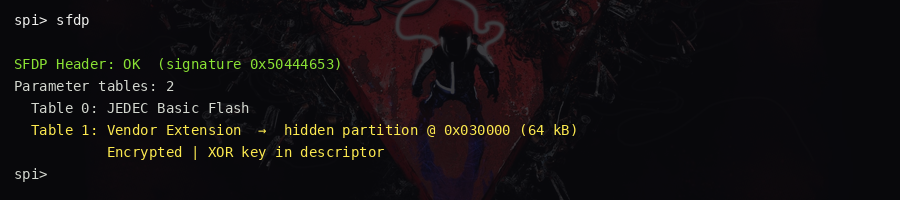
Step 4 — Read the vendor SFDP table
tx 5A 00 00 80 00
The vendor table data includes a hidden partition entry:
Offset: 0x030000
Label:  HIDDEN
Size:   4096 bytes
This partition does not appear in the normal partition table.
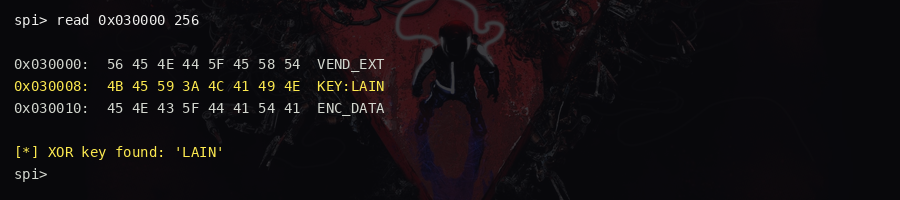
Step 5 — Read the hidden partition
Use the READ opcode 0x03 with 3-byte address:
tx 03 03 00 00
The response starts with the ASCII header WIRED_HIDDEN_PARTITION followed by
XOR-encrypted bytes.
Step 6 — Decrypt the flag
The data is XOR'd with the repeating key WIRED_SPI:
# data_hex = hex bytes from the tx read response after the header
key = b"WIRED_SPI"
encrypted = bytes.fromhex("...")  # from response
flag = bytes(b ^ key[i % len(key)] for i, b in enumerate(encrypted))
print(flag.rstrip(b'\x00').decode())

Key concepts
- SPI flash commands: Standard opcodes work across most vendors:
0x9F= RDID,0x03= READ,0x5A= SFDP - SFDP: Serial Flash Discoverable Parameters standardises capability discovery; vendor-specific extensions can hide extra metadata, including non-standard partition info
- Hidden partitions: Not all sectors appear in standard partition tables — manual probing or SFDP analysis is required to find them
- Data at rest XOR: Simple XOR protection on stored secrets is common in embedded firmware; knowing the plaintext structure (header magic bytes) allows key recovery
Flag
ESPILON{sp1_fl4sh_3xf1ltr4t3d}