| assets/images | ||
| espilon_bot | ||
| tools | ||
| .gitignore | ||
| CONTRIBUTING.md | ||
| LICENSE | ||
| README.en.md | ||
| README.md | ||

Espilon

Embedded ESP32 Agent Framework for Security Research and IoT



Important
: Espilon is intended for security research, authorized penetration testing, and education. Unauthorized use is illegal. Always obtain written permission before any deployment.
Full Documentation
View the full documentation here
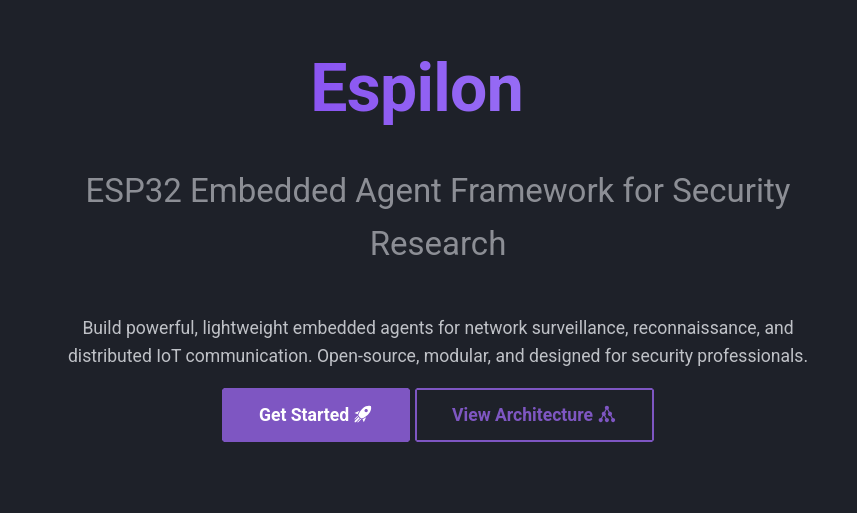
The MkDocs documentation includes:
- Step-by-step installation guide
- Translate EN/FR
- WiFi and GPRS configuration
- Module and command reference
- Multi-device flasher guide
- C2 protocol specification
- Examples and use cases
Quick Start
Prerequisites
- ESP-IDF v5.3.2
- Python 3.8+
- ESP32 (any compatible model)
- LilyGO T-Call for GPRS mode (optional)
Quick Installation
# 1. Install ESP-IDF v5.3.2
mkdir -p ~/esp
cd ~/esp
git clone -b v5.3.2 --recursive https://github.com/espressif/esp-idf.git
cd esp-idf
./install.sh esp32
. ./export.sh

# 2. Clone Espilon
cd ~
git clone https://github.com/yourusername/epsilon.git
cd epsilon/espilon_bot

# 3. Configure
idf.py menuconfig

# 4. Build and flash
idf.py build
idf.py -p /dev/ttyUSB0 flash monitor
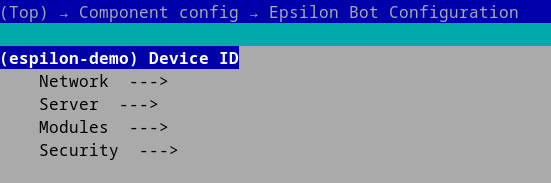
Minimal configuration (menuconfig):
Espilon Bot Configuration
  |- Device ID: "your_unique_id"
  |- Network -> WiFi
  |   |- SSID: "YourWiFi"
  |   |- Password: "YourPassword"
  |- Server
      |- IP: "192.168.1.100"
      |- Port: 2626
What is Espilon?
Espilon transforms affordable ESP32 microcontrollers (~$5) into powerful networked agents for:
- Security research: WiFi testing, network reconnaissance, IoT pentesting
- Education: Learning embedded systems, network protocols, FreeRTOS
- IoT prototyping: Distributed communication, monitoring, sensors
Connectivity Modes
| Mode | Hardware | Range | Use Case |
|---|---|---|---|
| WiFi | Standard ESP32 | 50-100m | Labs, buildings |
| GPRS | LilyGO T-Call | National (2G) | Mobile, remote |
Architecture
+---------------------------------------------------------+
|                     ESP32 Agent                         |
|  +-----------+  +----------+  +---------------------+   |
|  |  WiFi/    |->| ChaCha20 |->|   C2 Protocol       |   |
|  |  GPRS     |<-|  Crypto  |<-|  (nanoPB/TCP)       |   |
|  +-----------+  +----------+  +---------------------+   |
|         |              |                 |              |
|  +-----------------------------------------------------+|
|  |           Module System (FreeRTOS)                  ||
|  |  [Network] [FakeAP] [Recon] [Custom...]             ||
|  +-----------------------------------------------------+|
+---------------------------------------------------------+
                        | Encrypted TCP
              +---------------------+
              |   C2 Server (C3PO)  |
              |  - Device Registry  |
              |  - Group Management |
              |  - CLI Interface    |
              +---------------------+
Key Components
- Core: Network connection, ChaCha20 crypto, nanoPB protocol
- Modules: Extensible system (Network, FakeAP, Recon, etc.)
- C2 (C3PO): Python asyncio server for multi-agent control
- Flasher: Automated multi-device flashing tool
Available Modules
Important note: Modules are mutually exclusive. You must choose only one module during configuration via menuconfig.
System Module (Built-in, always active)
Basic system commands:
system_reboot: Reboot the ESP32system_mem: Display memory usage (heap free, heap min, internal free)system_uptime: Uptime since boot
Network Module
Module for network reconnaissance and testing:
ping <host> [args...]: ICMP connectivity testarp_scan: Discover hosts on local network via ARPproxy_start <ip> <port>: Start a TCP proxyproxy_stop: Stop the running proxydos_tcp <ip> <port> <count>: TCP load test (authorized use only)
FakeAP Module
Module for creating simulated WiFi access points:
fakeap_start <ssid> [open|wpa2] [password]: Start a fake access pointfakeap_stop: Stop the fake APfakeap_status: Display status (AP, portal, sniffer, clients)fakeap_clients: List connected clientsfakeap_portal_start: Enable captive portalfakeap_portal_stop: Disable captive portalfakeap_sniffer_on: Enable network traffic capturefakeap_sniffer_off: Disable capture
Recon Module
Reconnaissance and data collection module. Two modes available:
Camera Mode (ESP32-CAM)
cam_start <ip> <port>: Start UDP video streaming (~7 FPS, QQVGA)cam_stop: Stop streaming
BLE Trilateration Mode
trilat start <mac> <url> <bearer>: Start BLE trilateration with HTTP POSTtrilat stop: Stop trilateration
Configuration: idf.py menuconfig -> Espilon Bot Configuration -> Modules
Choose only one module:
CONFIG_MODULE_NETWORK: Enable the Network ModuleCONFIG_MODULE_FAKEAP: Enable the FakeAP ModuleCONFIG_MODULE_RECON: Enable the Recon Module- Then choose:
CameraorBLE Trilateration
- Then choose:
Tools
Multi-Device Flasher
Automated flasher to configure multiple ESP32s:
cd tools/flasher
python3 flash.py --config devices.json
devices.json:
{
  "project": "/path/to/espilon_bot",
  "devices": [
    {
      "device_id": "esp001",
      "port": "/dev/ttyUSB0",
      "network_mode": "wifi",
      "wifi_ssid": "MyNetwork",
      "wifi_pass": "MyPassword",
      "srv_ip": "192.168.1.100"
    }
  ]
}
See tools/flasher/README.md for complete documentation.
C2 Server (C3PO)
Command & Control server:
cd tools/c2
pip3 install -r requirements.txt
python3 c3po.py --port 2626
Commands:
list: List connected agentsselect <id>: Select an agentcmd <command>: Execute a commandgroup: Manage agent groups
Security
Encryption
- ChaCha20 for C2 communications
- Configurable keys via menuconfig
- Protocol Buffers (nanoPB) for serialization
CHANGE DEFAULT KEYS for production use:
# Generate random keys
openssl rand -hex 32  # ChaCha20 key (32 bytes)
openssl rand -hex 12  # Nonce (12 bytes)
Responsible Use
Espilon should only be used for:
- Authorized penetration testing
- Ethical security research
- Education and training
- Legitimate IoT prototyping
Prohibited: Unauthorized access, malicious attacks, privacy violations.
Use Cases
WiFi Pentesting
- Network security auditing
- WPA2/WPA3 robustness testing
- Network mapping
IoT Security Research
- IoT device testing
- Protocol analysis
- Vulnerability detection
Education
- Cybersecurity labs
- Embedded systems courses
- CTF competitions
Roadmap
V2.0 (In Progress)
- Mesh networking (BLE/WiFi)
- Improve documentation
- OTA updates
- Collaborative multilateration
- Memory optimization
Future
- Custom Espilon PCB
- ESP32-S3/C3 support
- Module SDK for third-party extensions
- Web UI for C2
License
Espilon is licensed under MIT with a security addendum.
See LICENSE for full details.
In summary:
- Free use for research, education, development
- Modification and distribution allowed
- Obtain authorization before any deployment
- Malicious use strictly prohibited
Contributors
- @Eun0us - Core architecture, modules
- @off-path - C2 server, protocol
- @itsoktocryyy - Network features, work on Mod Wall Hack
- @wepfen - Documentation, tools
Contributing
Contributions welcome! See CONTRIBUTING.md.
Join us:
- Report bugs
- Propose features
- Submit PRs
- Improve documentation
Useful Links
- Full documentation
- ESP-IDF Documentation
- LilyGO T-Call
- French README: README.md
Support
- Issues: GitHub Issues
- Discussions: GitHub Discussions
Originally presented at Le Hack (June 2025)
Made with love for security research and education