 ac82d8367e
- Generated screenshots for all 33 challenges (ESP, Hardware, IoT, OT, Misc, Web3)
- Replaced all 123 placeholder lines with actual PNG image references
- Cleaned duplicate images from previously partial updates
- All write-ups now have full illustrated solutions
141 lines
2.9 KiB
Markdown
141 lines
2.9 KiB
Markdown
# Serial Experimental 00
|
|
|
|
| Field | Value |
|
|
|-------|-------|
|
|
| Category | Hardware |
|
|
| Difficulty | Easy |
|
|
| Points | 150 |
|
|
| Author | Eun0us |
|
|
| CTF | Espilon 2026 |
|
|
|
|
---
|
|
|
|
## Description
|
|
|
|
You gained access to a split UART debug interface from a WIRED-MED prototype.
|
|
|
|
- TX (read): `tcp/<host>:1111`
|
|
- RX (write): `tcp/<host>:2222`
|
|
|
|
Investigate serial diagnostics, recover the maintenance token, then unlock the node.
|
|
|
|
Format: **ESPILON{...}**
|
|
|
|
---
|
|
|
|
## TL;DR
|
|
|
|
Connect to the split UART interface. Query `diag.uart`, `diag.eeprom`, and `diag.order`
|
|
on the RX port. Decode three fragments (one is plain hex, one is XOR-obfuscated, one is
|
|
ASCII-encoded) and concatenate them to form the token `LAIN-SERIAL-00`. Submit with
|
|
`unlock LAIN-SERIAL-00` to receive the flag.
|
|
|
|
---
|
|
|
|
## Tools
|
|
|
|
| Tool | Purpose |
|
|
|------|---------|
|
|
| `nc` | Connect to TX and RX ports |
|
|
| Python 3 | XOR decoding of fragment B |
|
|
|
|
---
|
|
|
|
## Solution
|
|
|
|
### Step 1 — Open both channels
|
|
|
|
```bash
|
|
# Terminal 1 — read output (TX)
|
|
nc <host> 1111
|
|
|
|
# Terminal 2 — send commands (RX)
|
|
nc <host> 2222
|
|
```
|
|
|
|

|
|
|
|
### Step 2 — Query the diagnostic commands
|
|
|
|
In the RX terminal:
|
|
|
|
```text
|
|
diag.uart
|
|
diag.eeprom
|
|
diag.order
|
|
```
|
|
|
|
Watch the TX terminal for responses.
|
|
|
|
### Step 3 — Recover the fragments
|
|
|
|
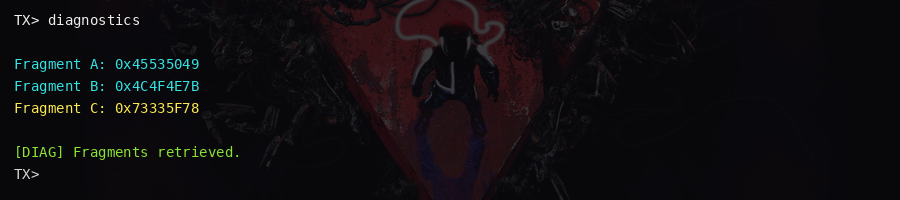
Each diagnostic command returns a fragment:
|
|
|
|
**Fragment A** — from `diag.uart`:
|
|
|
|
```
|
|
frag_a_hex=4c41494e
|
|
```
|
|
|
|
Decode: `bytes.fromhex("4c41494e").decode()` → `LAIN`
|
|
|
|
**Fragment B** — from `diag.eeprom`:
|
|
|
|
```
|
|
frag_b_xor_hex=4056415a525f
|
|
xor_key=0x13
|
|
```
|
|
|
|
Decode:
|
|
|
|
```python
|
|
data = bytes.fromhex("4056415a525f")
|
|
key = 0x13
|
|
result = bytes(b ^ key for b in data)
|
|
print(result.decode()) # SERIAL
|
|
```
|
|
|
|
**Fragment C** — from `diag.order`:
|
|
|
|
```
|
|
frag_c_hex=3030
|
|
```
|
|
|
|
Decode: `bytes.fromhex("3030").decode()` → `00`
|
|
|
|
|
|
|
|
### Step 4 — Build the maintenance token
|
|
|
|
Concatenate in the order specified by `diag.order`:
|
|
|
|
```
|
|
LAIN + "-" + SERIAL + "-" + 00 = LAIN-SERIAL-00
|
|
```
|
|
|
|
### Step 5 — Unlock the node
|
|
|
|
In the RX terminal:
|
|
|
|
```text
|
|
unlock LAIN-SERIAL-00
|
|
```
|
|
|
|
The flag is returned on the TX terminal.
|
|
|
|

|
|
|
|
### Key concepts
|
|
|
|
- **Split UART**: TX and RX are on separate TCP ports — mirrors real hardware where TX/RX
|
|
lines are physically separated. You must open both simultaneously.
|
|
- **Hex encoding**: Raw bytes presented as hex strings are common in serial diagnostic outputs.
|
|
- **XOR obfuscation**: Fragment B uses a single-byte XOR key; knowing the key is trivial
|
|
once you have the hint.
|
|
|
|
---
|
|
|
|
## Flag
|
|
|
|
`ESPILON{l41n_s3r14l_3xp_00}`
|